
Price Catalog Template
A clear price catalog helps customers order and saves you answering the same questions. Enter your products once — name, SKU, description, unit and price, plus an optional wholesale price or discount — and this template lays them out by category, with your business details and an effective date, ready to print or save as PDF. It is kept in your browser, so you can come back and update prices.
- Free to use
- No sign-up
- Runs in your browser
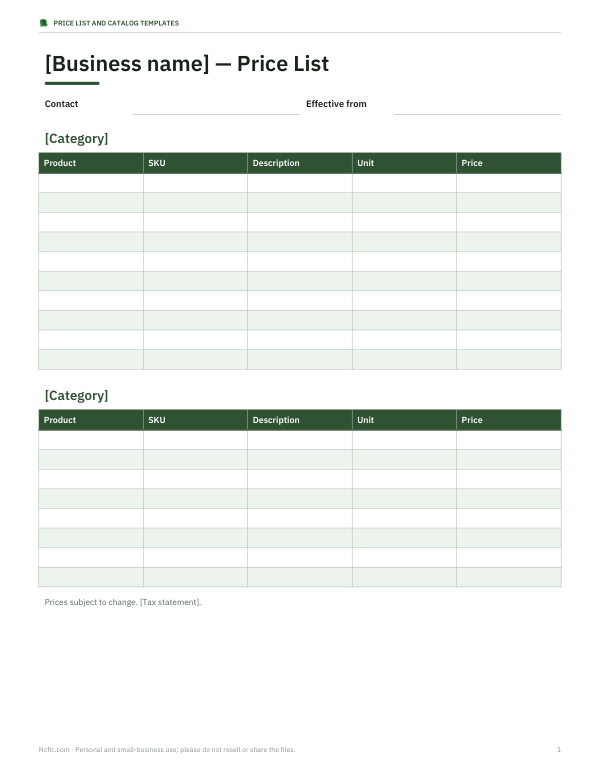
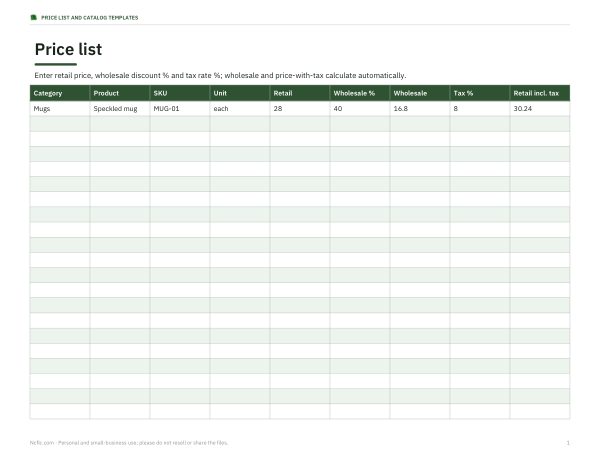
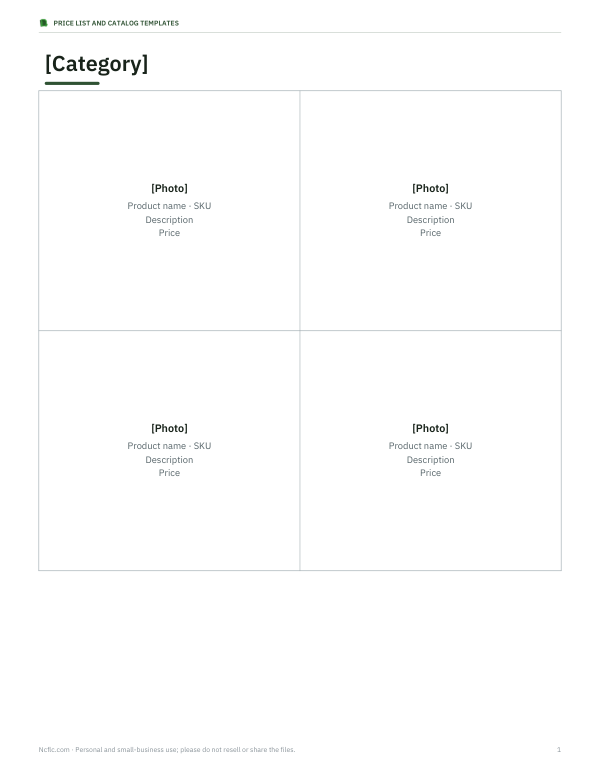
Price catalog builder
| Category | Product | SKU | Description | Unit | Retail | Wholesale |
|---|
Price List and Catalog Templates
Editable Word price list with logo area, an Excel price list with automatic wholesale and tax columns, a catalog page with photo frames and a wholesale terms sheet.
- Word price list (DOCX/PDF)
- Excel price list (XLSX)
- Catalog page (PDF)
- Wholesale terms (DOCX/PDF)
Formats: DOCX, PDF, XLSX. Instant download after payment (link valid 72 hours, up to 5 downloads). AI-assisted: the templates were drafted with AI help and reviewed and laid out before publishing.
$5.00 USD, one-time 4 files · about $1.25 each
- Instant download
- 7-day refund
- Secure checkout by Stripe
7-day money-back guarantee. Full refund within 7 days of purchase, even after you download.
Free sample: Catalog Page Photos (PDF, 60 KB)
Full refund within 7 days — see the refund policy and license.
Free printables
Single sheets you can print right now, no sign-up. The full pack adds every sheet in one download plus the editable files.
 Wholesale Terms Price List Template
What a price catalog should include
| Element | Why it matters |
|---|---|
| Business name and contact details | Customers know who to order from |
| Effective date | Avoids disputes when prices change |
| Categories | Makes long lists easy to scan |
| Product name and SKU | SKUs prevent ordering mistakes |
| Short description | Size, material, colour or capacity |
| Unit | Each, pack, set, per metre, per kilo |
| Price and currency | Clear, with tax treatment stated |
| Terms | Minimum order, payment and delivery terms |
Retail and wholesale prices
Many small makers and suppliers keep one catalog with two columns: retail (what end customers pay) and wholesale (what shops pay to resell). A common starting point is wholesale at about half of retail — a 50% discount, sometimes called “keystone” pricing — though margins vary widely by industry. The builder can show wholesale as a percentage off retail or as your own prices per item. Only share wholesale prices with approved trade customers.
How to use the builder
- Enter your business name, contact line and the date prices take effect.
- Add products: category, name, SKU, description, unit and retail price.
- Choose whether to show a wholesale column and how to calculate it.
- Click Print / save as PDF, and choose “Save as PDF” in the print dialog to create a file you can email.
- Download CSV to keep a spreadsheet copy or import into other tools.
Your list is saved in this browser so you can update prices later. It is not uploaded anywhere.
Worked example
The example ceramics catalog has six products in three categories. With the wholesale column set to 40% off retail, the $28 speckled mug shows a wholesale price of $16.80 and the $140 plate set $84.00. Printed, the list fits on one page with each category under its own heading, the effective date at the top and a note that wholesale prices apply to trade accounts.
Sharing your catalog
- Email the PDF to customers and attach it to wholesale enquiries.
- Print copies for markets, fairs and shop counters.
- Upload the PDF to your website with the effective date in the file name, e.g. price-list-2026-10.pdf.
- For wholesale buyers, send a separate PDF with wholesale prices and terms.
- Keep the CSV as your master copy and regenerate the PDF when prices change.
Price increases
When costs rise, update the catalog with a new effective date and tell existing customers in advance — thirty days’ notice is a courteous standard for regular trade customers. Changing prices once or twice a year, rather than item by item every month, keeps things simple for you and your buyers.
Pricing tips
- Know your full cost per item (materials, labour, packaging, fees) before setting prices.
- Round prices consistently — ending in .00 or .95, not a mix.
- Show whether prices include sales tax or VAT.
- Review prices at least once a year and give customers notice of increases.
- Keep old catalogs on file with their effective dates.
Catalog layout tips
- Put best-sellers first within each category.
- Use short, consistent descriptions.
- Keep one product per line; avoid cramming.
- If you include photos, keep them the same size and style.
- Add minimum order quantities and lead times for wholesale buyers.
Price list, catalog or line sheet?
| Document | Contents | Used by |
|---|---|---|
| Price list | Products and prices in a compact table | Existing customers, quick reference |
| Catalog | Products with photos, descriptions and prices | New customers, marketing |
| Line sheet | Wholesale-focused: photos, SKUs, wholesale and retail prices, minimums | Shop buyers and trade shows |
| Quote | Prices for a specific customer and order | One-off or custom orders |
The builder produces a price list; add photos and terms from the templates pack to turn it into a line sheet.
SKUs made simple
A stock keeping unit (SKU) is your own code for each product variant. Short, readable codes work best: a category prefix and a number (MUG-01), plus a suffix for size or colour (MUG-01-BLU). Never reuse a SKU for a different product, even after discontinuing it — old orders and records would become confusing.
Templates pack
The optional pack includes an editable Word price list with a logo area, an Excel price list with automatic wholesale and tax columns, a product catalog page with photo frames and a wholesale terms sheet. The builder above is free.
AI-assisted content
This page was drafted with AI assistance and reviewed before publishing. Example products and prices are fictional.
Frequently asked questions
How do I make a price list?
List each product with a name, SKU, description, unit and price, grouped by category, with your contact details and an effective date.
What is wholesale pricing?
A lower price for businesses buying to resell, often around half of retail.
Can I save the catalog as a PDF?
Yes, print it and choose “Save as PDF”.
Is my price list saved?
Yes, in this browser on this device.
Can I export to Excel?
Yes, download the CSV and open it in Excel or Google Sheets.
Is my data uploaded?
No, it stays in your browser.
What is an SKU?
A stock keeping unit — your own code for each product variant, such as MUG-01-BLU.
Should prices include tax?
Say clearly whether they do; business buyers usually expect prices before tax.
How often should I update my price list?
At least once a year, or whenever costs change significantly.
Can I add more than one currency?
Make one list per currency by switching the currency and printing each version.